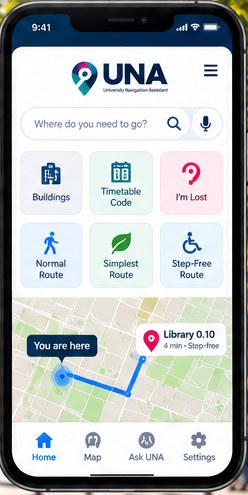
How UNA works
From campus to building to the exact room.
Search, choose, navigate, arrive — designed for people who know the room code but not the way.
- 1
Search
Enter a building, room, timetable code or destination — for example a code such as LIB 0.10 (illustrative).
- 2
Choose
Select a route: Normal, Simplest or Step-free.
- 3
Navigate
Receive clear step-by-step guidance. Where authorised and available, UNA may use appropriate positioning information to assist.
- 4
Arrive
Reach the exact destination more confidently and with less uncertainty.
The problem
Knowing the room number is not the same as knowing how to get there.
University timetables give codes like
LIB 0.10NEWSCI 0.03JSC 2.03But a new student or visitor may still not know:
- Where the building is
- Which entrance to use
- Which floor the room is on
- Which corridor to follow
- Whether a step-free route exists
- How long the journey may take
Illustrative example — not real building or navigation data
Timetable
LIB 0.10
Building
Library
Entrance
Main entrance
Indoor route
Floor 0
Destination
Room 0.10
Campus to classroom
From campus to building to the exact room.
UNA is designed to bridge the gap between ordinary outdoor mapping and detailed indoor wayfinding.
Outdoor / campus
Start
Your location
Then
University building
Then
Entrance
Indoor
Start
Entrance
Then
Floor
Then
Corridor
Arrive
Exact room
Where live campus location data is unavailable, you can still select the building and entrance manually. Standard GPS does not provide exact indoor room-level location, so UNA does not rely on it indoors.
Try UNA
The current web prototype demonstrates the UNA navigation experience while real building data is being collected and verified.
Prototype data must not be used for real navigation unless explicitly marked as verified.